Variance, temperature and style in AI voices: what the settings mean
AI text to speech voices let you tune variance, temperature, stability and style. Here's what each setting does and which to choose for everyday speech.
Variance, temperature and stability are different names for the same idea: how much an AI voice is allowed to vary its delivery each time it speaks. Low settings give a consistent, predictable read; high settings give a more expressive one, with more risk of odd emphasis. Style controls are separate, and steer the kind of delivery, such as cheerful, calm or whispered.
This short guide explains what these settings do, why they exist, and how to choose between them.
Why AI voices vary at all
Older text to speech voices were stitched together from recorded fragments or generated by fixed rules, so the same sentence always sounded identical. Modern AI voices are generative: the model predicts the sound of speech one small step at a time, and at each step it chooses from a range of likely options rather than always taking the single most likely one.
That small element of chance is what makes AI voices sound human. People never say a sentence the same way twice either. It also means the same text can come out slightly differently on each attempt: a pause in a new place, a word stressed differently, a warmer or flatter tone.
Variance settings let you control how wide that range of choices is.
Variance, temperature and stability: one dial, three names
Different apps and providers label this control differently, but they work in the same direction.
| Name you’ll see | Lower setting | Higher setting |
|---|---|---|
| Temperature | More consistent, predictable reads | More variation between reads of the same text |
| Variance (e.g. Stable, Balanced, Creative) | Steady, repeatable delivery | Livelier, more varied delivery |
| Stability (where higher means steadier) | Broader emotional range, less predictable | Steadier, but can sound monotonous |
Note that stability runs the opposite way round: ElevenLabs, for example, describes lower stability as giving a broader emotional range and higher stability as risking a monotonous voice with limited emotion. The trade-off is the same either way.
Temperature is the term used in many developer APIs. It comes from machine learning, where it describes how adventurous a model is when choosing its next output. A low temperature makes the voice stick closely to its most likely delivery; a high temperature lets it explore.
Style: steering how it sounds
Variance controls how much a voice changes. Style controls point it in a particular direction. Providers do this in a few ways:
- Named speaking styles. Microsoft’s Azure Speech lets developers mark text with styles such as cheerful, empathetic or calm, and a style degree that sets how strongly it’s applied, for voices that support them.
- Written instructions. OpenAI’s gpt-4o-mini-tts accepts plain-language instructions about tone and delivery, such as “speak warmly and slowly”.
- Inline tags. Some newer models accept cues inside the text itself. ElevenLabs’ v3 model, for example, supports audio tags such as [whispers] and [laughs].
- Style exaggeration. Some providers offer a slider that amplifies a voice’s natural speaking style, often with a note that it can make the output less stable.
These controls are mostly found in developer tools and creator platforms. Everyday text to speech apps usually keep things simpler, with a single variance or expressiveness setting.
Which setting should you choose?
It depends on what you’re using the voice for.
| What you’re doing | Best setting | Why |
|---|---|---|
| Everyday conversation and saved phrases | Stable or Balanced | Familiar phrases sound the same each time, and listeners get used to your voice |
| Important or formal moments | Stable | Fewer surprises in emphasis when it really matters |
| Chatting with friends and family | Balanced | Natural variety without sounding unpredictable |
| Stories, jokes and reading aloud | Creative | More expression keeps longer speech engaging |
| Voiceovers and content creation | Creative, then regenerate | Try a few takes and keep the best one |
A good rule of thumb: start in the middle, listen to a few sentences you’d really say, and only then adjust. If a voice sounds flat, move towards more variance. If it occasionally stresses the wrong word or sounds overdramatic, move back towards stable.
For more ways to improve how a voice sounds, such as punctuation for pauses and spelling out tricky names, see our guide to making text to speech sound natural.
Variance in MyVoice
MyVoice’s AI voices have a Variance setting with three options: Stable, Balanced and Creative. You’ll find it in Settings, under Voice settings, alongside the speed slider.
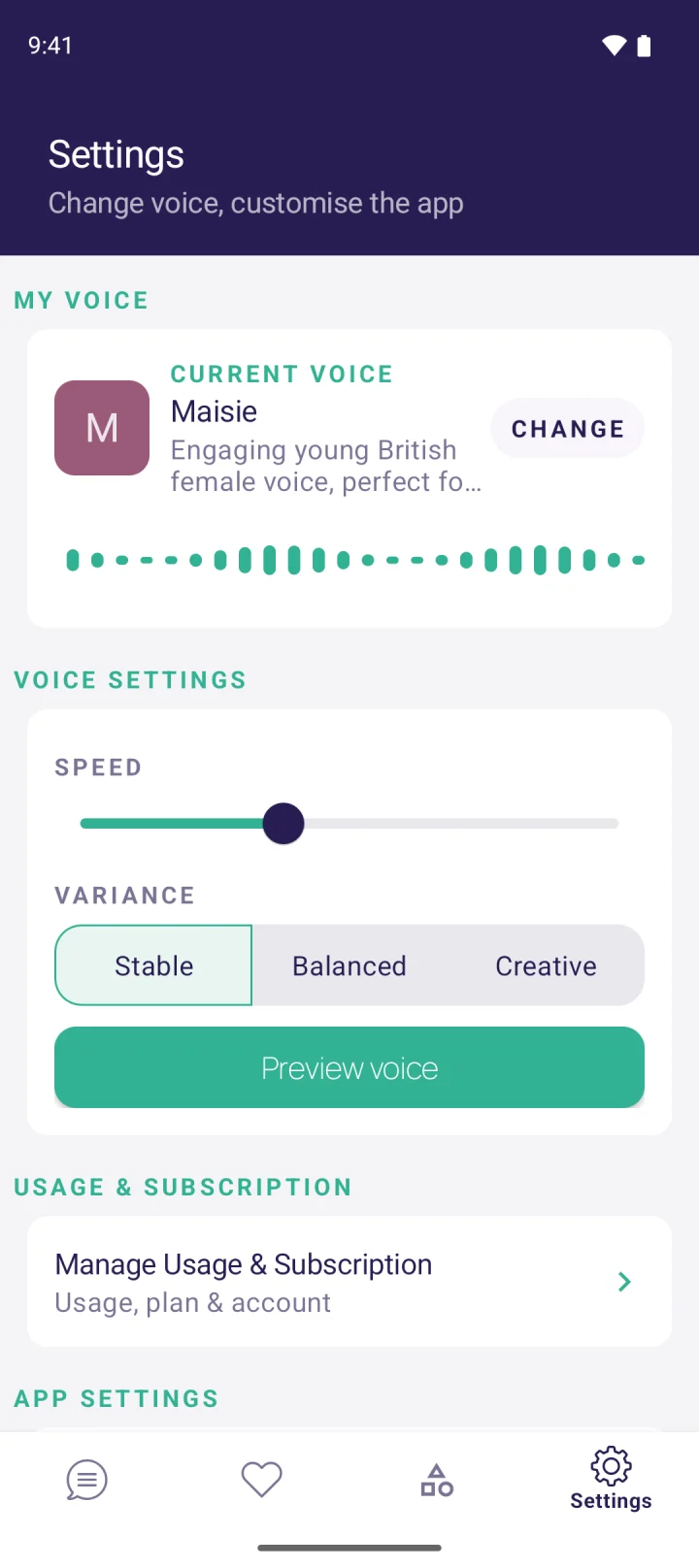
Because MyVoice is built for speaking out loud in everyday life, many people find Stable or Balanced the most comfortable: the phrases you use every day sound reassuringly familiar. Switch to Creative when you want more personality, then use Preview voice to hear the difference straight away. You can also hear every MyVoice voice before you install the app.
FAQ
Is temperature the same as variance in text to speech?
They describe the same idea. Temperature is the technical term used in many APIs; variance, expressiveness or stability are friendlier labels for the same trade-off between consistency and expression.
Why does my AI voice say the same sentence differently each time?
Modern AI voices generate speech with a small, deliberate element of chance, which makes them sound more human. Lowering the variance or temperature makes repeated reads more consistent.
Which variance setting is best for AAC?
For everyday communication, Stable or Balanced usually works best, because saved phrases sound the same each time and the people you talk to get used to your voice. Creative is worth trying for storytelling and casual chat.
Does a higher variance make a voice sound more realistic?
Up to a point. A little variation sounds natural, but very high settings can lead to odd pauses or emphasis. The most realistic results usually come from a moderate setting and a well-chosen voice. Our guide to the most realistic AI voices covers what else makes a voice sound human.
Download MyVoice
Try for free
Natural AI voices, saved phrases, and full accessibility support on iOS and Android.